Every uncategorised QuickBooks entry, sorted by AI. Approved by you.
Metis takes the categorising off your plate. It reads new Bills, Purchases and Deposits as they arrive, suggests the account from each client's own chart, and writes back only what you approve.
New firms are approved before first use.

- Connects to QuickBooks Online
- Built for accountants and bookkeepers
- Nothing changes in QuickBooks without your approval
How it works
From uncategorised to done in three steps
-
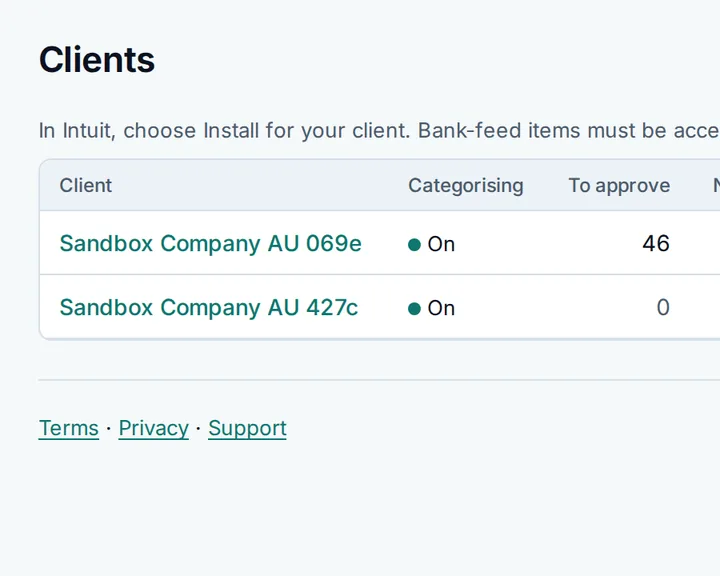
Connect a client
Sign in to Intuit once per client. Metis finds every uncategorised entry and keeps watching for new ones.
-
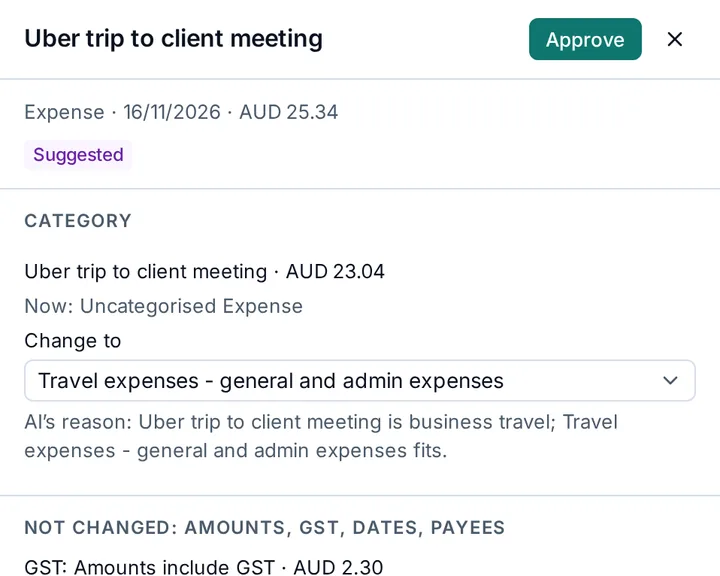
AI suggests the account
Each suggestion comes from that client's own chart of accounts, with the reason it was chosen. Unclear entries go to you for review.
-
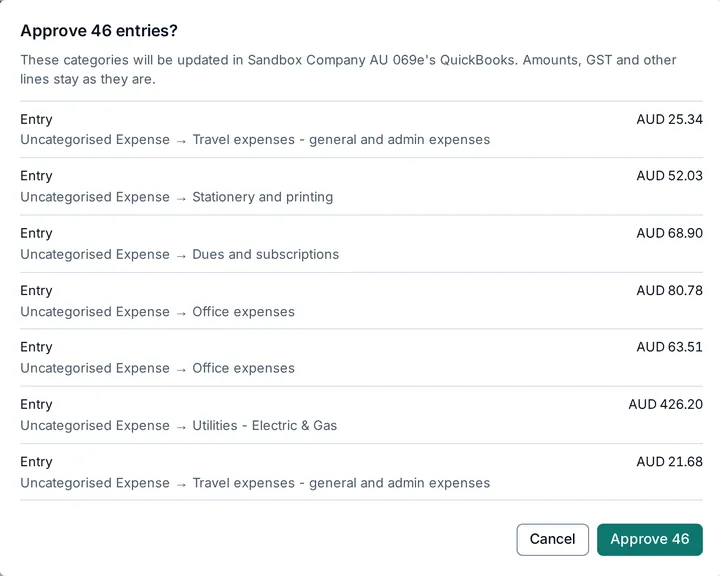
Approve, and it's back in QuickBooks
Approve one entry or the whole list. You see every change before it is sent, and Metis updates only the category.


Built on QuickBooks Online
A careful connection to your clients' books
-
New entries appear on their own
QuickBooks tells Metis when an entry is added or changed, so new work shows up moments later. No exports, no refresh button.
-
Each client's own chart of accounts
Suggestions use the accounts that client already has. Metis never adds accounts.
-
Your edits in QuickBooks win
If someone changes an entry in QuickBooks, Metis does not overwrite it. It suggests again from the new version.
-
Never sent twice
If a change's outcome is unclear, Metis checks QuickBooks before doing anything else, and tells you if it still can't confirm.
-
Amounts stay as they are
Only the category changes. Amounts, GST, dates and payees are left exactly as they are in QuickBooks.
-
Your whole team, the right clients
Invite owners, admins, accountants and viewers, and choose which clients each person can see.
You stay in control
AI does the sorting. Your firm signs off.
Metis is built for review first. A suggestion is only a suggestion until a person on your team approves it.
- One switch per client. Turn categorising on or off for each client at any time.
- Pause all clients. One switch stops every client's work at once. Suggestions are kept.
- AI only when you allow it. Your firm turns on AI suggestions before the first one is made.
- Every approval recorded. Metis keeps a record of who approved each change and when, and the Applied list shows what was sent.
Security and data
Your clients' books, handled with care
Two-step verification
Add an authenticator app to your account, and Metis asks for a code at every sign-in.
Encrypted connections
QuickBooks access is stored encrypted and is never shown to anyone, including your team.
Each firm kept separate
Every request is checked against your firm and your role, so one firm can never see another's clients.
Only what the AI needs
The AI sees an entry's description, amount and the client's account names. Never passwords or QuickBooks sign-ins, and Metis does not train AI models on your clients' records.
Read the Privacy policy for exactly what is processed and where.
Questions
Frequently asked questions
Does Metis change QuickBooks without me?
No. Metis suggests a category and waits. Nothing is written to QuickBooks until someone on your team approves it.
Which transactions does Metis categorise?
Bills, Purchases (expenses) and Deposits that sit on an uncategorised account. Bank-feed items in QuickBooks' For review list need to be accepted in QuickBooks first; then Metis picks them up.
What does the AI see?
The entry's description and amount, and the names of the client's accounts. It never sees passwords or QuickBooks sign-ins. Metis does not train AI models on your clients' records.
Where is my data kept?
On secure cloud servers, encrypted in transit. The Privacy policy explains where data is processed and for how long it is kept.
Who on my team can see which clients?
Owners and admins see every client. Accountants and viewers see only the clients you give them, and only accountants and above can approve.
How do I start?
Create an account and verify your email. New firms are approved before first use; then connect your first client from the Clients page.
Start with one client.
See your first suggestions minutes after you connect.